1.5.1 ROS File System
The ROS filesystem level refers to the organization of the ROS source code on the hard disk. Its structure can be roughly represented as shown in the following diagram: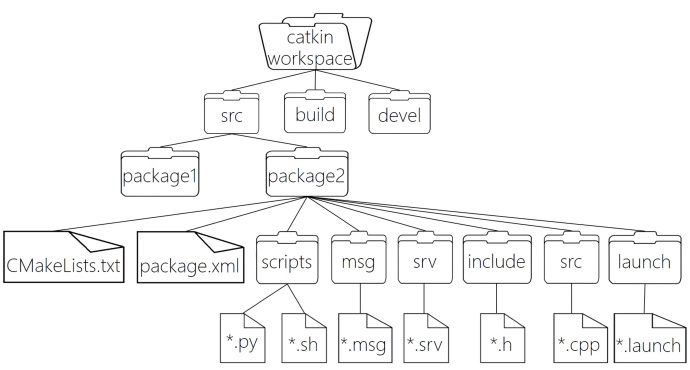
WorkSpace --- Custom workspace

    |--- build: Build space, used to store CMake and catkin cache information, configuration files, and other intermediate files.

    |--- devel: Development space, used to store the generated target files after compilation, including header files, dynamic & static link libraries, executables, etc.

    |--- src: Source code

        |-- package: Functional package (the basic unit of ROS), containing multiple nodes, libraries, and configuration files. The package name should be in all lowercase letters and can only consist of letters, numbers, and underscores.

            |-- CMakeLists.txt: Configures compilation rules, such as source files, dependencies, target files.

            |-- package.xml: Package information, such as: package name, version, author, dependencies... (In older versions, this was manifest.xml).

            |-- scripts: Stores Python files.

            |-- src: Stores C++ source files.

            |-- include: Header files.

            |-- msg: Message communication format files.

            |-- srv: Service communication format files.

            |-- action: Action format files.

            |-- launch: Can run multiple nodes at once.

            |-- config: Configuration information.

        |-- CMakeLists.txt: Basic configuration for compilation.
Some directories and files in the ROS filesystem have already been encountered in previous programming sections, such as the creation of functional packages, writing cpp files under the src directory, writing Python files under the scripts directory, writing launch files under the launch directory, and configuring the package.xml and CMakeLists.txt files. Content in other directories will be introduced later in the tutorial. Currently, we focus on these two configuration files: package.xml and CMakeLists.txt.
1. package.xml
This file defines properties about the software package, such as the package name, version number, author, maintainer, and dependencies on other catkin packages. Please note that this concept is similar to the manifest.xml file used in the legacy rosbuild system.
<?xml version="1.0"?>
<!-- Format: Previously 1, format 2 is recommended -->
<package format="2">
  <!-- Package Name -->
  <name>demo01_hello_vscode</name>
  <!-- Version -->
  <version>0.0.0</version>
  <!-- Description -->
  <description>The demo01_hello_vscode package</description>

  <!-- One maintainer tag required, multiple allowed, one person per tag -->
  <!-- Example:  -->
  <!-- <maintainer email="jane.doe@example.com">Jane Doe</maintainer> -->
  <!-- Maintainer -->
  <maintainer email="xuzuo@todo.todo">xuzuo</maintainer>

  <!-- One license tag required, multiple allowed, one license per tag -->
  <!-- Commonly used license strings: -->
  <!--   BSD, MIT, Boost Software License, GPLv2, GPLv3, LGPLv2.1, LGPLv3 -->
  <!-- License Information, ROS core components default to BSD -->
  <license>TODO</license>

  <!-- Url tags are optional, but multiple are allowed, one per tag -->
  <!-- Optional attribute type can be: website, bugtracker, or repository -->
  <!-- Example: -->
  <!-- <url type="website">http://wiki.ros.org/demo01_hello_vscode</url> -->

  <!-- Author tags are optional, multiple are allowed, one per tag -->
  <!-- Authors do not have to be maintainers, but could be -->
  <!-- Example: -->
  <!-- <author email="jane.doe@example.com">Jane Doe</author> -->

  <!-- The *depend tags are used to specify dependencies -->
  <!-- Dependencies can be catkin packages or system dependencies -->
  <!-- Examples: -->
  <!-- Use depend as a shortcut for packages that are both build and exec dependencies -->
  <!--   <depend>roscpp</depend> -->
  <!--   Note that this is equivalent to the following: -->
  <!--   <build_depend>roscpp</build_depend> -->
  <!--   <exec_depend>roscpp</exec_depend> -->
  <!-- Use build_depend for packages you need at compile time: -->
  <!--   <build_depend>message_generation</build_depend> -->
  <!-- Use build_export_depend for packages you need in order to build against this package: -->
  <!--   <build_export_depend>message_generation</build_export_depend> -->
  <!-- Use buildtool_depend for build tool packages: -->
  <!--   <buildtool_depend>catkin</buildtool_depend> -->
  <!-- Use exec_depend for packages you need at runtime: -->
  <!--   <exec_depend>message_runtime</exec_depend> -->
  <!-- Use test_depend for packages you need only for testing: -->
  <!--   <test_depend>gtest</test_depend> -->
  <!-- Use doc_depend for packages you need only for building documentation: -->
  <!--   <doc_depend>doxygen</doc_depend> -->
  <!-- Build tool dependency, this is mandatory -->
  <buildtool_depend>catkin</buildtool_depend>

  <!-- Specifies packages required to build this package -->
  <build_depend>roscpp</build_depend>
  <build_depend>rospy</build_depend>
  <build_depend>std_msgs</build_depend>

  <!-- Specifies packages required to build libraries against this package -->
  <build_export_depend>roscpp</build_export_depend>
  <build_export_depend>rospy</build_export_depend>
  <build_export_depend>std_msgs</build_export_depend>

  <!-- Packages required to run code in this package -->
  <exec_depend>roscpp</exec_depend>
  <exec_depend>rospy</exec_depend>
  <exec_depend>std_msgs</exec_depend>

  <!-- The export tag contains other, unspecified, tags -->
  <export>
    <!-- Other tools can request additional information be placed here -->
  </export>
</package>
2. CMakeLists.txt
The CMakeLists.txt file is the input for the CMake build system and is used to build the software package. Any CMake-compatible package contains one or more CMakeLists.txt files that describe how to build the code and where to install it.
cmake_minimum_required(VERSION 3.0.2) # Required CMake version
project(demo01_hello_vscode) # Package name, can be referenced as ${PROJECT_NAME}

## Compile as C++11, supported in ROS Kinetic and newer
# add_compile_options(-std=c++11)

## Find catkin macros and libraries
## if COMPONENTS list like find_package(catkin REQUIRED COMPONENTS xyz)
## is used, also find other catkin packages
# Set packages required for building
find_package(catkin REQUIRED COMPONENTS
  roscpp
  rospy
  std_msgs
)

## System dependencies are found with CMake's conventions
# Add system dependencies by default
# find_package(Boost REQUIRED COMPONENTS system)


## Uncomment this if the package has a setup.py. This macro ensures
## modules and global scripts declared therein get installed
## See http://ros.org/doc/api/catkin/html/user_guide/setup_dot_py.html
# Enable Python module support
# catkin_python_setup()

################################################
## Declare ROS messages, services and actions ##
################################################

## To declare and build messages, services or actions from within this
## package, follow these steps:
## * Let MSG_DEP_SET be the set of packages whose message types you use in
##   your messages/services/actions (e.g. std_msgs, actionlib_msgs, ...).
## * In the file package.xml:
##   * add a build_depend tag for "message_generation"
##   * add a build_depend and a exec_depend tag for each package in MSG_DEP_SET
##   * If MSG_DEP_SET isn't empty the following dependency has been pulled in
##     but can be declared for certainty nonetheless:
##     * add a exec_depend tag for "message_runtime"
## * In this file (CMakeLists.txt):
##   * add "message_generation" and every package in MSG_DEP_SET to
##     find_package(catkin REQUIRED COMPONENTS ...)
##   * add "message_runtime" and every package in MSG_DEP_SET to
##     catkin_package(CATKIN_DEPENDS ...)
##   * uncomment the add_*_files sections below as needed
##     and list every .msg/.srv/.action file to be processed
##   * uncomment the generate_messages entry below
##   * add every package in MSG_DEP_SET to generate_messages(DEPENDENCIES ...)

## Generate messages in the 'msg' folder
# add_message_files(
#   FILES
#   Message1.msg
#   Message2.msg
# )

## Generate services in the 'srv' folder
# add_service_files(
#   FILES
#   Service1.srv
#   Service2.srv
# )

## Generate actions in the 'action' folder
# add_action_files(
#   FILES
#   Action1.action
#   Action2.action
# )

## Generate added messages and services with any dependencies listed here
# Dependencies when generating messages and services
# generate_messages(
#   DEPENDENCIES
#   std_msgs
# )

################################################
## Declare ROS dynamic reconfigure parameters ##
################################################

## To declare and build dynamic reconfigure parameters within this
## package, follow these steps:
## * In the file package.xml:
##   * add a build_depend and a exec_depend tag for "dynamic_reconfigure"
## * In this file (CMakeLists.txt):
##   * add "dynamic_reconfigure" to
##     find_package(catkin REQUIRED COMPONENTS ...)
##   * uncomment the "generate_dynamic_reconfigure_options" section below
##     and list every .cfg file to be processed

## Generate dynamic reconfigure parameters in the 'cfg' folder
# generate_dynamic_reconfigure_options(
#   cfg/DynReconf1.cfg
#   cfg/DynReconf2.cfg
# )

###################################
## catkin specific configuration ##
###################################
## The catkin_package macro generates cmake config files for your package
## Declare things to be passed to dependent projects
## INCLUDE_DIRS: uncomment this if your package contains header files
## LIBRARIES: libraries you create in this project that dependent projects also need
## CATKIN_DEPENDS: catkin_packages dependent projects also need
## DEPENDS: system dependencies of this project that dependent projects also need
# Runtime dependencies
catkin_package(
#  INCLUDE_DIRS include
#  LIBRARIES demo01_hello_vscode
#  CATKIN_DEPENDS roscpp rospy std_msgs
#  DEPENDS system_lib
)

###########
## Build ##
###########

## Specify additional locations of header files
## Your package locations should be listed before other locations
# Add header file paths, current package's header path comes before others
include_directories(
# include
  ${catkin_INCLUDE_DIRS}
)

## Declare a C++ library
# Declare C++ library
# add_library(${PROJECT_NAME}
#   src/${PROJECT_NAME}/demo01_hello_vscode.cpp
# )

## Add cmake target dependencies of the library
## as an example, code may need to be generated before libraries
## either from message generation or dynamic reconfigure
# Add CMake target dependencies for the library
# add_dependencies(${PROJECT_NAME} ${${PROJECT_NAME}_EXPORTED_TARGETS} ${catkin_EXPORTED_TARGETS})

## Declare a C++ executable
## With catkin_make all packages are built within a single CMake context
## The recommended prefix ensures that target names across packages don't collide
# Declare C++ executable
add_executable(Hello_VSCode src/Hello_VSCode.cpp)

## Rename C++ executable without prefix
## The above recommended prefix causes long target names, the following renames the
## target back to the shorter version for ease of user use
## e.g. "rosrun someones_pkg node" instead of "rosrun someones_pkg someones_pkg_node"
# Rename C++ executable
# set_target_properties(${PROJECT_NAME}_node PROPERTIES OUTPUT_NAME node PREFIX "")

## Add cmake target dependencies of the executable
## same as for the library above
# Add CMake target dependencies for the executable
add_dependencies(Hello_VSCode ${${PROJECT_NAME}_EXPORTED_TARGETS} ${catkin_EXPORTED_TARGETS})

## Specify libraries to link a library or executable target against
# Specify libraries to link against the executable
target_link_libraries(Hello_VSCode
  ${catkin_LIBRARIES}
)

#############
## Install ##
#############

# all install targets should use catkin DESTINATION variables
# See http://ros.org/doc/api/catkin/html/adv_user_guide/variables.html

## Mark executable scripts (Python etc.) for installation
## in contrast to setup.py, you can choose the destination
# Set executable scripts for installation
catkin_install_python(PROGRAMS
  scripts/Hi.py
  DESTINATION ${CATKIN_PACKAGE_BIN_DESTINATION}
)

## Mark executables for installation
## See http://docs.ros.org/melodic/api/catkin/html/howto/format1/building_executables.html
# install(TARGETS ${PROJECT_NAME}_node
#   RUNTIME DESTINATION ${CATKIN_PACKAGE_BIN_DESTINATION}
# )

## Mark libraries for installation
## See http://docs.ros.org/melodic/api/catkin/html/howto/format1/building_libraries.html
# install(TARGETS ${PROJECT_NAME}
#   ARCHIVE DESTINATION ${CATKIN_PACKAGE_LIB_DESTINATION}
#   LIBRARY DESTINATION ${CATKIN_PACKAGE_LIB_DESTINATION}
#   RUNTIME DESTINATION ${CATKIN_GLOBAL_BIN_DESTINATION}
# )

## Mark cpp header files for installation
# install(DIRECTORY include/${PROJECT_NAME}/
#   DESTINATION ${CATKIN_PACKAGE_INCLUDE_DESTINATION}
#   FILES_MATCHING PATTERN "*.h"
#   PATTERN ".svn" EXCLUDE
# )

## Mark other files for installation (e.g. launch and bag files, etc.)
# install(FILES
#   # myfile1
#   # myfile2
#   DESTINATION ${CATKIN_PACKAGE_SHARE_DESTINATION}
# )

#############
## Testing ##
#############

## Add gtest based cpp test target and link libraries
# catkin_add_gtest(${PROJECT_NAME}-test test/test_demo01_hello_vscode.cpp)
# if(TARGET ${PROJECT_NAME}-test)
#   target_link_libraries(${PROJECT_NAME}-test ${PROJECT_NAME})
# endif()

## Add folders to be run by python nosetests
# catkin_add_nosetests(test)